Guidance to Cloud Databases
Effective data use is a key success factor for companies of any size today. However, getting the most out of your database and becoming an expert in all of its features and capabilities is challenging. Rather than investing in costly in-house resources, more and more companies are opting to outsource their database sets to professionals.
After all, very few businesses out there consider database management their core focus and mission.
Many smaller companies simply don’t have the resources to cover this area in such depth. And why should they? After all, the company's mission is to deliver products or services that delight their customers, not become extremely proficient at managing their data.
Partnering with a cloud database management provider is a solution that comes with a number of advantages, including lower capital expenses and less reliance on in-house expertise.
There are plenty of database-as-a-service (DBaaS) suppliers out there, and this article will help you understand what cloud databases are, how you can use them to your advantage, and what questions to ask your potential supplier to equip your business with the best solution.
Index
- What is a cloud database?
- What is Database-as-a-Service (DBaaS)?
- Why do you need a cloud database?
- 6 benefits of cloud databases
- How does a cloud database work?
- The difference between cloud databases and alternatives
- How to use cloud databases: 5 best practices for PostgreSQL and MySQL
What is a cloud database?
A cloud database is a database that a provider delivers via the internet, usually as part of a broader offering. Just like traditional on-premises databases, cloud databases organize and store structured, unstructured, and semi-structured data. At the same time, they provide the benefits of cloud computing, such as speed, scalability, agility, and cost savings.
Cloud databases are divided into relational databases and non-relational databases:
- Relational cloud databases are made up of one or more tables with columns and rows that allow you to organize data in predetermined relationships so that you can understand how data is logically related.
These databases typically have a set data format, and you can query and alter the data using structured query language (SQL). They are highly consistent and dependable, and they are ideally suited to dealing with enormous amounts of structured data.
SQL Server, Oracle, MySQL, PostgreSQL, Spanner, and Cloud SQL are examples of relational databases. - Non-relational cloud databases are used for managing unstructured data such as email and mobile messaging text, documents, surveys, rich media assets, and sensor data. They don’t adhere to a predefined schema like relational databases and allow you to save and organize data in any format.
MongoDB, Redis, Cassandra, Hbase, and Cloud Bigtable are examples of non-relational databases.
What is a MySQL database?
MySQL has been in existence for a very long time, beginning as an open-source project and now owned by Oracle.
It’s exceptionally fast as a fully relational database, and its massive installation base means that there is a big ecosystem of applications, extensions, and customizations accessible. MySQL is today a high-performance database that can handle practically any business application.
What is a PostgreSQL database?
PostgreSQL (Postgres) is a popular choice in the open-source community since it's object-relational rather than solely relational. In addition, Postgres is considered more enterprise-level than MySQL, with built-in replication, redundant structures, and failover principles.
Since Postgres has a lower installation base than MySQL, you can choose from fewer third-party apps and modifications. However, in practice, this is rarely a problem; there are still tens of thousands of extensions on offer.
If your database applications use a lot of concurrent activities, such as inherited tables, PostgreSQL will perform better. For reading large amounts of data, MySQL may perform better.
What is Database-as-a-Service (DBaaS)?
Database-as-a-Service (DBaaS) is a cloud database service that gives users access to a database without requiring them to set up and manage the underlying infrastructure. It’s a managed database service, which implies that the provider manages the patching, updating, and backup of the database.
How does DBaaS work?
The service is often supplied over the internet, with customers gaining access via a web-based interface or API. Data backup and recovery, scalability, and performance monitoring are common capabilities and tools provided by DBaaS providers.
One of the primary advantages of DBaaS is that it helps minimize the complexity and expense of database management. Organizations can free up resources to focus on more strategic objectives by outsourcing these chores to a service provider.
Furthermore, DBaaS increases database availability and performance, as well as providing disaster recovery capabilities. As organizations become more reliant on data, DBaaS will likely become an integral component of their IT architecture.
What is the difference between DBaaS and PaaS?
There are a few key distinctions between DBaaS and PaaS. Database as a service is a managed service that provides a full database solution, whereas PaaS is an infrastructure framework for deploying and managing databases. DBaaS offers capabilities like automated backup and recovery, while PaaS does not.
One of the primary advantages of managed database services is that they handle all administrative tasks related to database administration, such as patching, updates, and monitoring, freeing up IT professionals to focus on other activities. Database as a service is also scalable and highly available, which can assist in cost reduction.
PaaS, on the other hand, is more adaptable and may be used to install apps other than databases. PaaS is often less costly than DBaaS. One of the biggest drawbacks of PaaS is that it requires greater technical skills to operate and maintain.
Why do you need a cloud database?
Data is likely the most precious asset companies have, and the pressure to leverage this asset is great regardless of the company’s size.
Here are a few challenges teams face around data today:
- The amount of data generated and gathered is increasing at an exponential rate. It's not only more diverse but also varied.
- Data might now live in on-premises databases as well as distributed cloud applications and services, making traditional techniques for integration problematic.
- Real-time data processing is becoming increasingly important for corporate success—delays and gaps in data transmission to mission-critical applications can have disastrous implications.
- Legacy databases face substantial problems as the ways businesses use data evolve, and transitioning to a modern solution is challenging across multiple dimensions.
Why Database-as-a-Service?
Moving your database applications to the cloud doesn’t just free up server space.
If you outsource the management of that environment - tasks like configurations, capacity planning, and resource allocation - you will have a lot more time to conduct the database work that is important to you: storing data, using data, and transforming data.
That's ideally what DBaaS provides:
All the behind-the-scenes stuff stays behind the scenes and is professionally maintained, so you don't have to lift a finger.
Cloud databases offer flexibility, dependability, security, and cost, among other benefits. Providing a strong foundation for the development of modern commercial applications. They can quickly respond to changing workloads and needs without adding to the stress of already overburdened teams.
6 benefits of cloud databases
Reduced operational costs
Cloud databases reduce the need for physical infrastructure management and maintenance. Your cloud provider provisions, updates, and maintains all hardware, operating systems, and database software.
Reduced total cost of ownership
Since the cloud service provider owns and controls the infrastructure, teams can concentrate on developing applications. Furthermore, pay-as-you-go alternatives enable you to provision what you need, when you need it, and scale up or down based on your usage.
Improved scalability and agility
You can create a new cloud database or decommission an existing one in just a few minutes. This enables you to test, operationalize, and validate new ideas more quickly. Furthermore, cloud databases may scale dynamically as your applications evolve and provide consistent performance even under tremendous load.
Flexibility
You can select purpose-built cloud databases with capabilities and performance that are tailored to your individual use case and application requirements.
Security
Cloud providers invest in the best technology and people in order to provide several layers of protection and unified security policies that can help protect customer data while allowing for creativity.
When checking provider security, consider the kind of data you’re planning to store there. Some data types might fall under specific regulations that will impact your cloud offering choice.
Availability
Cloud systems, including cloud databases, include a slew of built-in capabilities aimed at ensuring continuous connectivity and meeting SLAs, such as high availability, and robust disaster recovery.
Monitoring
Database monitoring is all about reviewing the database's operational status on a regular basis. It’s essential for maintaining the performance and health of your database management system. Luckily, some cloud service providers offer monitoring as part of their cloud database offerings.
Tilaa Cloud VPS - Reliable cloud
For developers who are looking for a flexible, fast and secure cloud solution to build and grow their business.
How does a cloud database work?
Cloud computing providers offer cloud database solutions that replicate the same information across multiple servers to eliminate the potential for data loss or destruction.
Instead of looking for data processing on a single server, having the cloud database spread across numerous servers makes it easier and faster for users to get information through a web portal or other front-end software.
When a user registers on a cloud web portal to request data, the server knows where to find it and promptly downloads it.
The beauty of a cloud database is that you outsource the management of that environment. There’s no need for the data engineering team to dedicate precious time to jobs around configuration, capacity planning, and resource allocation.
To help you understand how cloud databases work, let’s zoom in on an example.
Cloud-based MySQL database
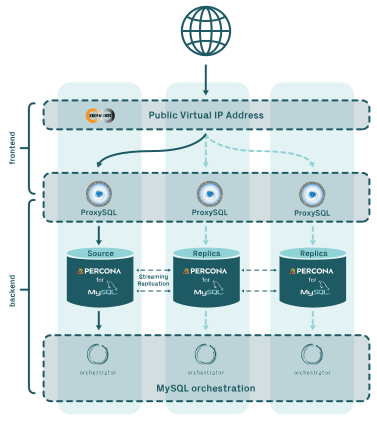
A MySQL cloud database lets teams use the world's most popular open-source relational database without having to worry about the technical specifics. There’s no need to spend time performing maintenance checks, patching, or fixing replication issues.
The solution is compatible with a broad range of existing tooling, comes with automated failover for redundant deployments, is fully managed with automated updates and upgrades, and offers dedicated nodes for even more airtight isolation.
Maximizing your database potential: top three best practices
Cloud databases can be a powerful tool, but they also come with their own unique challenges. In this article, we share a few of the best practices to give you a head start.
The difference between cloud databases and alternatives
The market for cloud databases is brimming with different solutions, each with a variety of services added on top. You can divide cloud databases into two general types:
Self-managed database
A self-managed cloud database is one in which a company acquires storage from a cloud service provider but controls and oversees the database itself.
In this scenario, teams typically oversee the database and ensure its proper operation. Users can still access data through the internet, but workers manage and administer the database internally
Managed database
Businesses can store data on the cloud using autonomous cloud databases, but an external service manages and oversees the database's operation and management.
The service automates many operational elements that a business wants to implement, such as increased security, data backups, or storage.
This cloud database enables businesses to use the cloud without the need for a dedicated IT and maintenance team separate from the one that oversees the service provider. When problems emerge with autonomous databases, the external service resolves them.
Choosing the right cloud database
Here are a few aspects you should check with the cloud provider before getting a cloud database solution:
- Management of the underlying infrastructure - does the provider take care of that, or does this task fall on your shoulders?
- Updates - does the provider take care of all the necessary updates (for example, library updates)?
- Cluster configuration and replication - are these two services part of the cloud provider’s responsibilities as part of the cloud database offering?
- Charges for network use - does the provider have a system of fees for network usage?
- Charges for data transfer - major cloud providers usually let you upload data for free but add fees for moving data out (this includes inter-zone traffic)! Egress fees often transform into the hidden costs of cloud operations, so be sure to check your provider’s policy. For example, Tilaa doesn’t charge any egress fees or network usage fees.
How to use cloud databases: 5 best practices for PostgreSQL and MySQL databases
1. Create a strategy for cloud data management
A cloud data management plan is a roadmap that depicts all of the components that make up the entire cloud data management architecture. Before transferring any organizational resources to the cloud, develop a strategy to guarantee that the cloud architecture meets the demands of the company.
While one firm may benefit from a rapid architecture like "lift and shift," another may want to scale on a budget by using "drop and shop."
A cloud data management plan encapsulates the core principles of data management and can assist enterprises in standardizing every area of data management.
From performance, efficiency, security, and privacy to analysis and business intelligence (BI), there is something for everyone. Control becomes an integrated cog in your data machine after you establish a strategy for the continuing activities of the data.
2. Use identity and access management (IAM) to protect data
Identity and access management (IAM) is a method for standardizing the methods used by companies to ensure that only authorized individuals have access to company-owned resources.
IAM allows you to manage user roles based on the following criteria:
- User role—what is the user's role?
- Access—which systems can the user access?
- Privileges—what level of access does the user have?
- Behavior—under what conditions will a person be refused access?
IAM gives teams the control they need to keep data safe from unauthorized parties, preventing trade secret theft by depriving ex-employees of their privileges. In addition, a corporation can use IAM to defend against external threats by implementing rules that prevent fraudsters from accessing data.
Examples of specialized IAM tools include Microsoft's Active Directory (AD) and biometric authentication (the process of granting or denying access to privileges based on biometric characteristics such as the iris and retina, fingerprints, and facial features).
An important aspect you should consider before uploading your data to a cloud database is the knowledge of where this data will reside and what data privacy or compliance the cloud solution must meet for your business. For example, Tilaa stores data in data centers located exclusively in Europe, helping companies achieve compliance with key regulations.
3. Don’t make your database available to the public
This point might seem obvious, but the number of exposed S3 buckets we hear about is on the rise. To stay on the safe side and minimize risk, make sure that no part of your cloud database is exposed to the public.
It doesn’t matter what regulations your company must follow - your customers will trust your business more if you show them your data is taken care of.
4. SLAs that help you sleep at night
Find a cloud provider that will manage your database environment as if it were their own. When it comes to SLAs and customer support, size matters a lot. Cloud giants like AWS have thousands of customers to take care of, and getting in touch with the support team might take a lot of time - especially if you’re not a tech giant that signed a multi-million deal with AWS.
Make sure that your provider is large enough to handle your data professionally, yet small enough to get to know their customers personally. Knowing who to contact if you need help with your cloud database setting is important.
6. Consider the pricing
The most significant advantage of outsourcing databases to the cloud is cost. With a typical in-house database, you'll be adding servers and storage as your needs expand, and utilization rates will frequently fall below 0% at night. You're paying for it, but you're not using it.
Still, billing gets tricky in the cloud - even with the comfort of pay-per-use cases. Look for a cloud provider that offers a variety of subscriptions and payment options that are appropriate for your business. Some may offer the added benefit of "burst capacity" when needed to expand the available resources in line with your rapidly growing needs.
7. Long-term partnership
Search for a provider who will become your technology partner, fully committed to constant improvement rather than simply keeping the wheels turning. A cloud partner who gives detailed performance information can intelligently address concerns, and actively works to improve your installation by automating tedious operations and optimizing database management.